> ## Documentation Index
> Fetch the complete documentation index at: https://sourcebot-whoisthey-language-model-input-modalities.mintlify.site/llms.txt
> Use this file to discover all available pages before exploring further.
# Docker Compose
This guide will teach you how to deploy Sourcebot using [Docker Compose](https://github.com/sourcebot-dev/sourcebot/blob/main/docker-compose.yml). This is the simplest way to get started with Sourcebot, and should only take a couple minutes.
If you are looking to deploy onto Kubernetes, see the [Kubernetes (Helm)](/docs/deployment/k8s) guide.
## System requirements
* RAM: Ensure your environment has at least 4GB of RAM. Insufficient memory may cause your Sourcebot deployment to be unstable.
* Docker & Docker Compose: Make sure both are installed and up-to-date.
* Node.js 18+: Required for the setup CLI
For a more detailed requirements breakdown, please check out our [sizing guide](/docs/deployment/sizing-guide).
## Option 1: Setup CLI
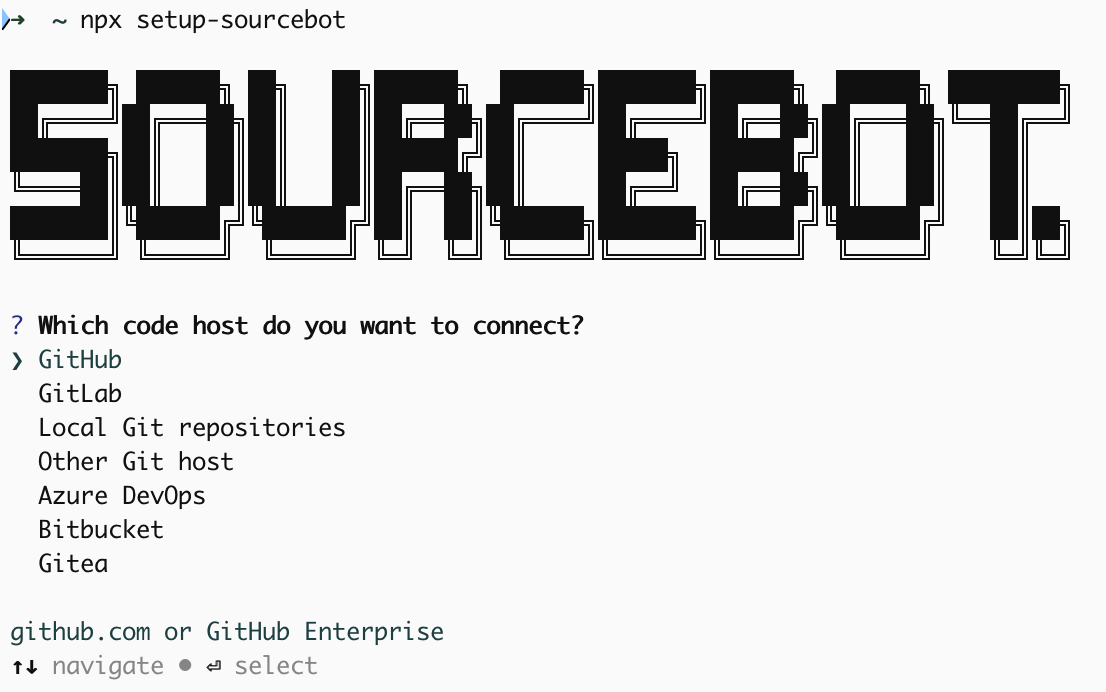
The setup CLI will guide you through deploying Sourcebot and connecting it to your code hosts and LLM providers. This will create a new directory and generate a [configuration file](/docs/configuration/config-file)
and Docker Compose file for you.
Run the following command to get started:
```
npx setup-sourcebot
```
 ## Option 2: Manual steps
### Obtain the Docker Compose file
Download the [docker-compose.yml](https://github.com/sourcebot-dev/sourcebot/blob/main/docker-compose.yml) file from the Sourcebot repository.
```bash wrap icon="terminal" theme={null}
curl -o docker-compose.yml https://raw.githubusercontent.com/sourcebot-dev/sourcebot/main/docker-compose.yml
```
### Create a config.json
In the same directory as the `docker-compose.yml` file, create a [configuration file](/docs/configuration/config-file). The configuration file is a JSON file that configures Sourcebot's behaviour, including which repos to index, what language models to use, and more.
```bash wrap icon="terminal" Create example config theme={null}
touch config.json
echo '{
"$schema": "https://raw.githubusercontent.com/sourcebot-dev/sourcebot/main/schemas/v3/index.json",
// Comments are supported.
// This config creates a single connection to GitHub.com that
// indexes the Sourcebot repository
"connections": {
"starter-connection": {
"type": "github",
"repos": [
"sourcebot-dev/sourcebot"
]
}
}
}' > config.json
```
### Launch your instance
Update the secrets in the `docker-compose.yml` and then run Sourcebot using:
```bash wrap icon="terminal" theme={null}
docker compose up
```
Navigate to [http://localhost:3000](http://localhost:3000) to access your Sourcebot instance.
## Next steps
Congrats, you've deployed Sourcebot! Check out the following guides to learn more.
#### Configuration
Connect Sourcebot to your code hosts and configure which repos to index.
Configure the LLM providers that power Ask Sourcebot.
Set up SSO and configure how users sign in to your instance.
Right-size your deployment based on the number of repos you're indexing.
#### Features
Search and navigate across all your repos and branches.
Ask questions across all your repos and branches.
Code context layer for all your agents.
## Option 2: Manual steps
### Obtain the Docker Compose file
Download the [docker-compose.yml](https://github.com/sourcebot-dev/sourcebot/blob/main/docker-compose.yml) file from the Sourcebot repository.
```bash wrap icon="terminal" theme={null}
curl -o docker-compose.yml https://raw.githubusercontent.com/sourcebot-dev/sourcebot/main/docker-compose.yml
```
### Create a config.json
In the same directory as the `docker-compose.yml` file, create a [configuration file](/docs/configuration/config-file). The configuration file is a JSON file that configures Sourcebot's behaviour, including which repos to index, what language models to use, and more.
```bash wrap icon="terminal" Create example config theme={null}
touch config.json
echo '{
"$schema": "https://raw.githubusercontent.com/sourcebot-dev/sourcebot/main/schemas/v3/index.json",
// Comments are supported.
// This config creates a single connection to GitHub.com that
// indexes the Sourcebot repository
"connections": {
"starter-connection": {
"type": "github",
"repos": [
"sourcebot-dev/sourcebot"
]
}
}
}' > config.json
```
### Launch your instance
Update the secrets in the `docker-compose.yml` and then run Sourcebot using:
```bash wrap icon="terminal" theme={null}
docker compose up
```
Navigate to [http://localhost:3000](http://localhost:3000) to access your Sourcebot instance.
## Next steps
Congrats, you've deployed Sourcebot! Check out the following guides to learn more.
#### Configuration
Connect Sourcebot to your code hosts and configure which repos to index.
Configure the LLM providers that power Ask Sourcebot.
Set up SSO and configure how users sign in to your instance.
Right-size your deployment based on the number of repos you're indexing.
#### Features
Search and navigate across all your repos and branches.
Ask questions across all your repos and branches.
Code context layer for all your agents.