> ## Documentation Index
> Fetch the complete documentation index at: https://sourcebot-whoisthey-language-model-input-modalities.mintlify.site/llms.txt
> Use this file to discover all available pages before exploring further.
# AI Code Review Agent
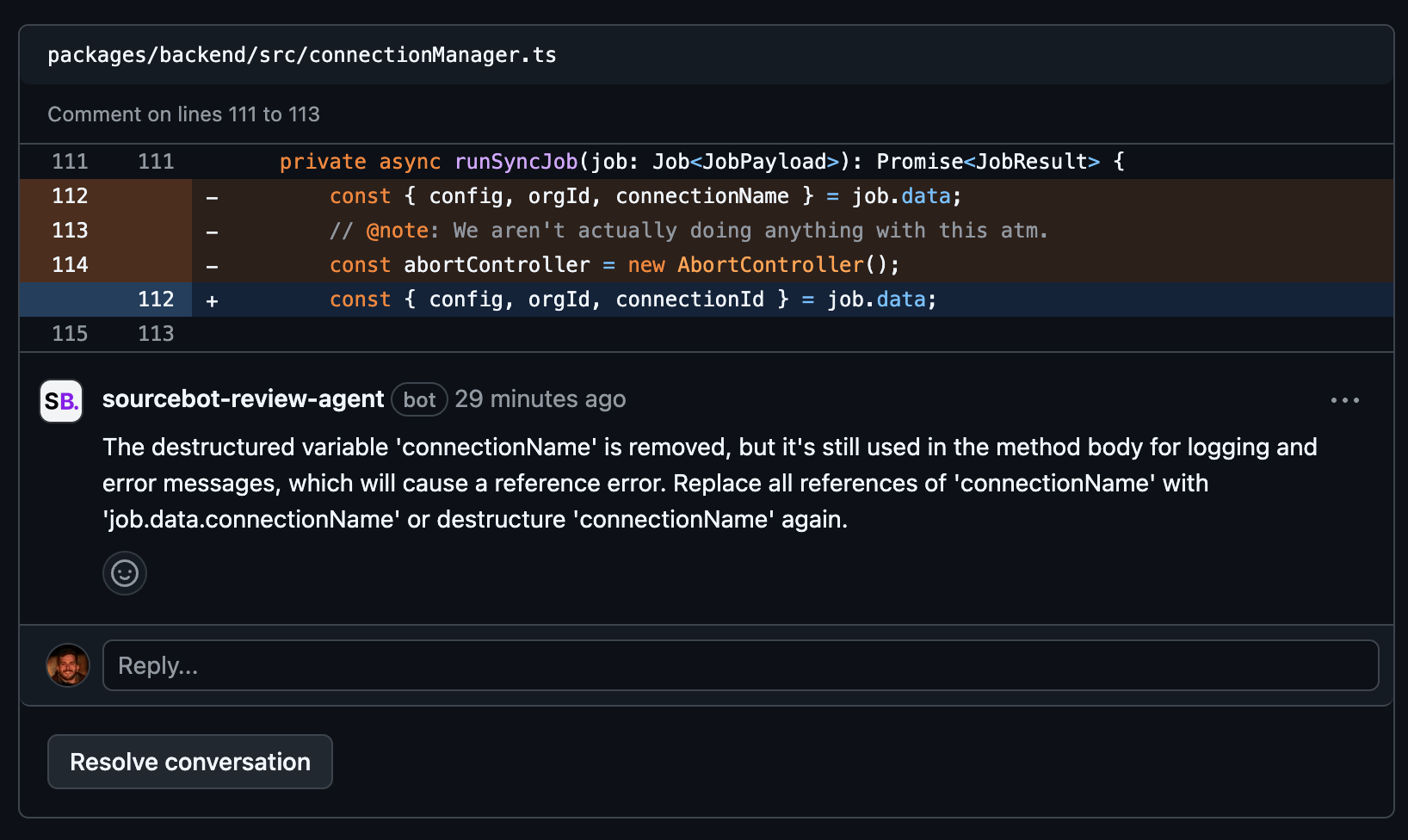
This agent provides codebase-aware reviews for your GitHub PRs and GitLab MRs. For each diff, the agent fetches relevant context from your indexed codebase and feeds it into a configured language model for a detailed review.
The AI Code Review Agent is [fair source](https://github.com/sourcebot-dev/sourcebot/tree/main/packages/web/src/features/agents/review-agent) and packaged in [Sourcebot](https://github.com/sourcebot-dev/sourcebot). To get started, [deploy Sourcebot](/docs/deployment/docker-compose) and follow the configuration instructions below.
 # Language model
The review agent uses whichever language model you have configured in your `config.json`. All providers supported by Sourcebot (OpenAI, Anthropic, AWS Bedrock, Azure OpenAI, and others) work out of the box.
If you have multiple models configured, set `REVIEW_AGENT_MODEL` to the `displayName` of the model you want the agent to use. If this variable is unset, the agent uses the first configured model.
# GitHub
Follow the official GitHub guide for [registering a GitHub app](https://docs.github.com/en/apps/creating-github-apps/registering-a-github-app/registering-a-github-app).
* **GitHub App name**: Any name you choose (e.g. Sourcebot Review Agent)
* **Homepage URL**: Any URL you choose (e.g. `https://www.sourcebot.dev/`)
* **Webhook URL** (required): Your Sourcebot deployment URL at `/api/webhook` (e.g. `https://sourcebot.example.com/api/webhook`). Your deployment must be reachable from GitHub. If you are running Sourcebot locally, use [smee](https://docs.github.com/en/apps/creating-github-apps/writing-code-for-a-github-app/quickstart#step-2-get-a-webhook-proxy-url) to [forward webhooks](https://docs.github.com/en/apps/creating-github-apps/writing-code-for-a-github-app/quickstart#step-6-start-your-server) to your local deployment.
* **Webhook Secret**: Any string (e.g. generate one with `python -c "import secrets; print(secrets.token_hex(10))"`)
* **Permissions**
* Pull requests: Read & Write
* Issues: Read & Write
* Contents: Read
* **Events**
* Pull request
* Issue comment
Navigate to your new [GitHub app's page](https://docs.github.com/en/apps/creating-github-apps/writing-code-for-a-github-app/quickstart#navigate-to-your-app-settings) and press **Install**.
Set the following environment variables in your Sourcebot deployment:
| Variable | Description |
| ------------------------------------------ | ------------------------------------------------------------------------------------------------------------------------------------------------------------------------------------------- |
| `GITHUB_REVIEW_AGENT_APP_ID` | The client ID of your GitHub app, found in your [app settings](https://docs.github.com/en/apps/creating-github-apps/writing-code-for-a-github-app/quickstart#navigate-to-your-app-settings) |
| `GITHUB_REVIEW_AGENT_APP_WEBHOOK_SECRET` | The webhook secret you set when registering the app |
| `GITHUB_REVIEW_AGENT_APP_PRIVATE_KEY_PATH` | Path to your app's private key file inside the container (e.g. `/data/review-agent-key.pem`). Copy the key file into the directory you mount to Sourcebot. |
You can generate a private key in your [app settings](https://docs.github.com/en/apps/creating-github-apps/writing-code-for-a-github-app/quickstart#navigate-to-your-app-settings).
# Language model
The review agent uses whichever language model you have configured in your `config.json`. All providers supported by Sourcebot (OpenAI, Anthropic, AWS Bedrock, Azure OpenAI, and others) work out of the box.
If you have multiple models configured, set `REVIEW_AGENT_MODEL` to the `displayName` of the model you want the agent to use. If this variable is unset, the agent uses the first configured model.
# GitHub
Follow the official GitHub guide for [registering a GitHub app](https://docs.github.com/en/apps/creating-github-apps/registering-a-github-app/registering-a-github-app).
* **GitHub App name**: Any name you choose (e.g. Sourcebot Review Agent)
* **Homepage URL**: Any URL you choose (e.g. `https://www.sourcebot.dev/`)
* **Webhook URL** (required): Your Sourcebot deployment URL at `/api/webhook` (e.g. `https://sourcebot.example.com/api/webhook`). Your deployment must be reachable from GitHub. If you are running Sourcebot locally, use [smee](https://docs.github.com/en/apps/creating-github-apps/writing-code-for-a-github-app/quickstart#step-2-get-a-webhook-proxy-url) to [forward webhooks](https://docs.github.com/en/apps/creating-github-apps/writing-code-for-a-github-app/quickstart#step-6-start-your-server) to your local deployment.
* **Webhook Secret**: Any string (e.g. generate one with `python -c "import secrets; print(secrets.token_hex(10))"`)
* **Permissions**
* Pull requests: Read & Write
* Issues: Read & Write
* Contents: Read
* **Events**
* Pull request
* Issue comment
Navigate to your new [GitHub app's page](https://docs.github.com/en/apps/creating-github-apps/writing-code-for-a-github-app/quickstart#navigate-to-your-app-settings) and press **Install**.
Set the following environment variables in your Sourcebot deployment:
| Variable | Description |
| ------------------------------------------ | ------------------------------------------------------------------------------------------------------------------------------------------------------------------------------------------- |
| `GITHUB_REVIEW_AGENT_APP_ID` | The client ID of your GitHub app, found in your [app settings](https://docs.github.com/en/apps/creating-github-apps/writing-code-for-a-github-app/quickstart#navigate-to-your-app-settings) |
| `GITHUB_REVIEW_AGENT_APP_WEBHOOK_SECRET` | The webhook secret you set when registering the app |
| `GITHUB_REVIEW_AGENT_APP_PRIVATE_KEY_PATH` | Path to your app's private key file inside the container (e.g. `/data/review-agent-key.pem`). Copy the key file into the directory you mount to Sourcebot. |
You can generate a private key in your [app settings](https://docs.github.com/en/apps/creating-github-apps/writing-code-for-a-github-app/quickstart#navigate-to-your-app-settings).
 Example `docker-compose.yml`:
```yaml theme={null}
services:
sourcebot:
image: ghcr.io/sourcebot-dev/sourcebot:latest
pull_policy: always
container_name: sourcebot
ports:
- "3000:3000"
volumes:
- "/home/user/sourcebot_workspace:/data"
environment:
CONFIG_PATH: "/data/config.json"
GITHUB_REVIEW_AGENT_APP_ID: "my-github-app-id"
GITHUB_REVIEW_AGENT_APP_WEBHOOK_SECRET: "my-webhook-secret"
GITHUB_REVIEW_AGENT_APP_PRIVATE_KEY_PATH: "/data/review-agent-key.pem"
```
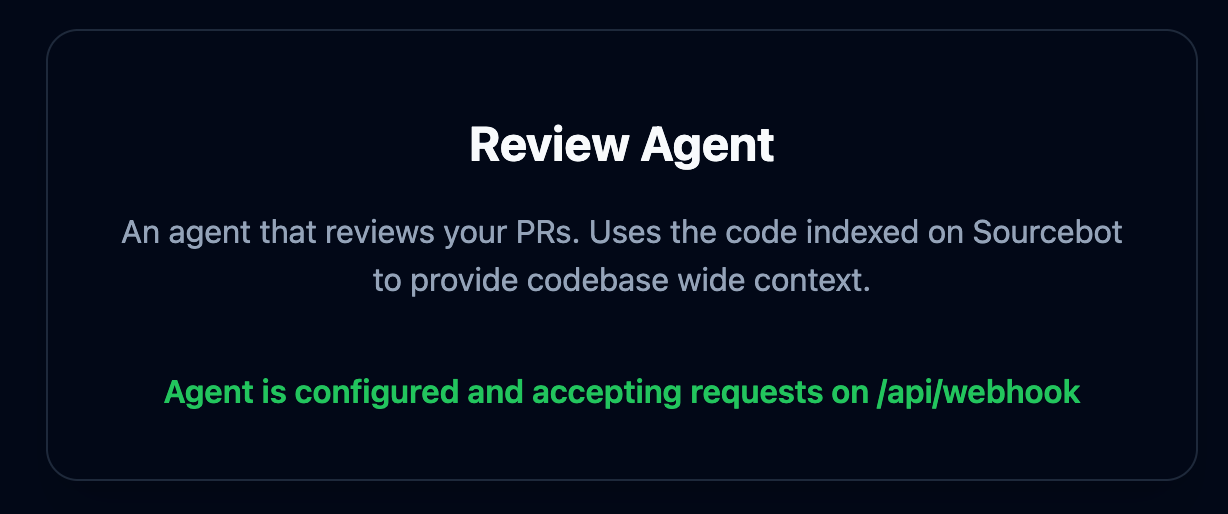
Navigate to **Agents** in the Sourcebot nav menu. If your environment variables are set correctly, the GitHub Review Agent card shows a confirmation that the agent is configured and accepting requests.
Example `docker-compose.yml`:
```yaml theme={null}
services:
sourcebot:
image: ghcr.io/sourcebot-dev/sourcebot:latest
pull_policy: always
container_name: sourcebot
ports:
- "3000:3000"
volumes:
- "/home/user/sourcebot_workspace:/data"
environment:
CONFIG_PATH: "/data/config.json"
GITHUB_REVIEW_AGENT_APP_ID: "my-github-app-id"
GITHUB_REVIEW_AGENT_APP_WEBHOOK_SECRET: "my-webhook-secret"
GITHUB_REVIEW_AGENT_APP_PRIVATE_KEY_PATH: "/data/review-agent-key.pem"
```
Navigate to **Agents** in the Sourcebot nav menu. If your environment variables are set correctly, the GitHub Review Agent card shows a confirmation that the agent is configured and accepting requests.
 # GitLab
Create a [personal access token](https://docs.gitlab.com/ee/user/profile/personal_access_tokens.html) or [project access token](https://docs.gitlab.com/ee/user/project/settings/project_access_tokens.html) with the following scope:
* `api`
Keep a note of the token value — you will need it in the next step.
In your GitLab project, go to **Settings → Webhooks** and add a new webhook:
* **URL**: Your Sourcebot deployment URL at `/api/webhook` (e.g. `https://sourcebot.example.com/api/webhook`)
* **Secret token**: Any string (e.g. generate one with `python -c "import secrets; print(secrets.token_hex(10))"`)
* **Trigger events**: Merge request events, Comments
Save the webhook.
Set the following environment variables in your Sourcebot deployment:
| Variable | Description |
| ------------------------------------ | ---------------------------------------------------------------------------------------------------------------------- |
| `GITLAB_REVIEW_AGENT_WEBHOOK_SECRET` | The secret token you set on the GitLab webhook |
| `GITLAB_REVIEW_AGENT_TOKEN` | The GitLab personal or project access token |
| `GITLAB_REVIEW_AGENT_HOST` | Your GitLab hostname. Defaults to `gitlab.com`. Set this for self-hosted GitLab instances (e.g. `gitlab.example.com`). |
Example `docker-compose.yml`:
```yaml theme={null}
services:
sourcebot:
image: ghcr.io/sourcebot-dev/sourcebot:latest
pull_policy: always
container_name: sourcebot
ports:
- "3000:3000"
volumes:
- "/home/user/sourcebot_workspace:/data"
environment:
CONFIG_PATH: "/data/config.json"
GITLAB_REVIEW_AGENT_WEBHOOK_SECRET: "my-webhook-secret"
GITLAB_REVIEW_AGENT_TOKEN: "glpat-my-token"
GITLAB_REVIEW_AGENT_HOST: "gitlab.example.com"
```
Navigate to **Agents** in the Sourcebot nav menu. If your environment variables are set correctly, the GitLab Review Agent card shows a confirmation that the agent is configured and accepting requests.
# Using the agent
By default, the agent does not review PRs and MRs automatically. To enable automatic reviews on every new or updated PR/MR, set `REVIEW_AGENT_AUTO_REVIEW_ENABLED` to `true`.
You can also trigger a review manually by commenting `/review` on any PR or MR. To use a different command, set `REVIEW_AGENT_REVIEW_COMMAND` to your preferred value (without the leading slash).
# Environment variable reference
| Variable | Default | Description |
| ---------------------------------- | ---------------------- | --------------------------------------------------------------- |
| `REVIEW_AGENT_AUTO_REVIEW_ENABLED` | `false` | Automatically review new and updated PRs/MRs |
| `REVIEW_AGENT_REVIEW_COMMAND` | `review` | Comment command that triggers a manual review (without the `/`) |
| `REVIEW_AGENT_MODEL` | first configured model | `displayName` of the language model to use for reviews |
| `REVIEW_AGENT_LOGGING_ENABLED` | unset | Write prompt and response logs to disk for debugging |
# GitLab
Create a [personal access token](https://docs.gitlab.com/ee/user/profile/personal_access_tokens.html) or [project access token](https://docs.gitlab.com/ee/user/project/settings/project_access_tokens.html) with the following scope:
* `api`
Keep a note of the token value — you will need it in the next step.
In your GitLab project, go to **Settings → Webhooks** and add a new webhook:
* **URL**: Your Sourcebot deployment URL at `/api/webhook` (e.g. `https://sourcebot.example.com/api/webhook`)
* **Secret token**: Any string (e.g. generate one with `python -c "import secrets; print(secrets.token_hex(10))"`)
* **Trigger events**: Merge request events, Comments
Save the webhook.
Set the following environment variables in your Sourcebot deployment:
| Variable | Description |
| ------------------------------------ | ---------------------------------------------------------------------------------------------------------------------- |
| `GITLAB_REVIEW_AGENT_WEBHOOK_SECRET` | The secret token you set on the GitLab webhook |
| `GITLAB_REVIEW_AGENT_TOKEN` | The GitLab personal or project access token |
| `GITLAB_REVIEW_AGENT_HOST` | Your GitLab hostname. Defaults to `gitlab.com`. Set this for self-hosted GitLab instances (e.g. `gitlab.example.com`). |
Example `docker-compose.yml`:
```yaml theme={null}
services:
sourcebot:
image: ghcr.io/sourcebot-dev/sourcebot:latest
pull_policy: always
container_name: sourcebot
ports:
- "3000:3000"
volumes:
- "/home/user/sourcebot_workspace:/data"
environment:
CONFIG_PATH: "/data/config.json"
GITLAB_REVIEW_AGENT_WEBHOOK_SECRET: "my-webhook-secret"
GITLAB_REVIEW_AGENT_TOKEN: "glpat-my-token"
GITLAB_REVIEW_AGENT_HOST: "gitlab.example.com"
```
Navigate to **Agents** in the Sourcebot nav menu. If your environment variables are set correctly, the GitLab Review Agent card shows a confirmation that the agent is configured and accepting requests.
# Using the agent
By default, the agent does not review PRs and MRs automatically. To enable automatic reviews on every new or updated PR/MR, set `REVIEW_AGENT_AUTO_REVIEW_ENABLED` to `true`.
You can also trigger a review manually by commenting `/review` on any PR or MR. To use a different command, set `REVIEW_AGENT_REVIEW_COMMAND` to your preferred value (without the leading slash).
# Environment variable reference
| Variable | Default | Description |
| ---------------------------------- | ---------------------- | --------------------------------------------------------------- |
| `REVIEW_AGENT_AUTO_REVIEW_ENABLED` | `false` | Automatically review new and updated PRs/MRs |
| `REVIEW_AGENT_REVIEW_COMMAND` | `review` | Comment command that triggers a manual review (without the `/`) |
| `REVIEW_AGENT_MODEL` | first configured model | `displayName` of the language model to use for reviews |
| `REVIEW_AGENT_LOGGING_ENABLED` | unset | Write prompt and response logs to disk for debugging |